 Magic Pulse
Choose well
Live waits and Events
Compare posted waits and operating status, then check weather, seasonal entertainment, Extended Evening Hours, and member-exclusive events. Schedules and coverage vary by park.
Explore live waitsThe full Magic Pulse toolkit
Magic Pulse brings live conditions, personal planning, and timely updates into one compact park-day view.
Choose well
Compare posted waits and operating status, then check weather, seasonal entertainment, Extended Evening Hours, and member-exclusive events. Schedules and coverage vary by park.
Explore live waitsShape the day
Keep rides, meals, events, and custom stops together. Review the order as conditions change, and check the timing of your reservations and shows before you move.
Explore My DayBuy with context
Put price beside standby time, forecast, history, and estimated time saved before you buy.
Explore Lightning LaneStay in reach
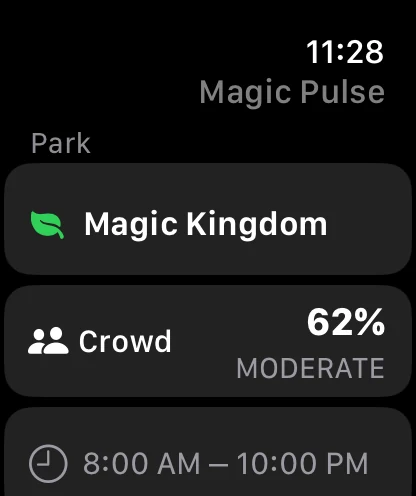
Check your park, top watchlist wait, crowd level, and hours at a glance. Pro alerts call out drops, reopenings, reminders, and weather changes.
Ask about Watch featuresKeep the group aligned
Sync your preferences through iCloud. Pro shared plans let invited family members see and edit the same plan across iPhone and iPad.
See the privacy detailsAfter the visit
Review the waits and queue drops that shaped your visit. Pro adds Live Activity, Home Screen widgets, Siri Shortcuts, and no ads.
See Free and ProBuilt for the whole park day
Seasonal guidance explains what is happening after regular park hours, while the Watch companion keeps your selected park, crowd level, and operating hours within reach.
Now suggestions and short-term forecasts help compare your options. Posted waits, ride availability, and park rules can change before you arrive.
Cached waits can help when the connection drops, but they are not a fresh update. On this website, delayed data keeps its posted waits while forecast advice is hidden.
Get help with delayed dataPro alerts depend on your selected park, app preferences, and iOS notification permission. Check quiet hours and system settings if an expected alert does not arrive.
Get notification helpOne app, four resorts
Walt Disney World, Disneyland Resort, Tokyo Disney Resort, and Disneyland Paris are supported in the same flow.
Free on iOS
Start with live waits and planning. Add Pro when alerts, sharing, widgets, and shortcuts are worth having ready.